How to Format a Two-Page ATS-Friendly Resume (With Examples)
Practical formatting guide for two-page resumes that pass ATS parsing: section order, page break placement, margin settings, font choices, and a checklist you can apply in 10 minutes.
7 min read · Updated August 2026
A two-page resume is ATS-friendly when it reads as one continuous document — single column, standard headings, consistent formatting, and a text layer that parsers can extract in order. This guide gives you the exact formatting rules and a checklist to verify your two-pager before you submit.
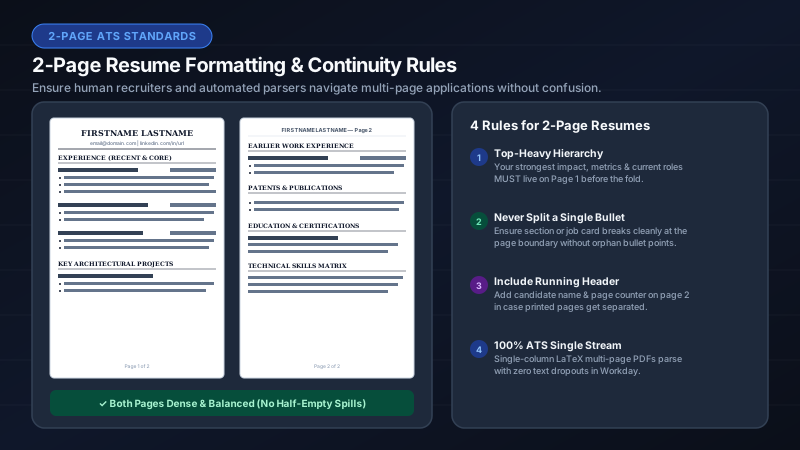
The two-page formatting checklist
- Single-column layout on both pages — no sidebars, no split columns.
- Same font family and size on both pages (10–12 pt).
- Same margins on both pages (0.5–0.75 in).
- Standard section headings: Experience, Education, Skills, Projects, Certifications.
- Contact info in the document body on page one only — not in a repeating header.
- Sections flow naturally across the page break — do not force a break before a section.
- No images, icons, skill bars, or decorative graphics on either page.
- Dates in consistent "Mon YYYY – Mon YYYY" format throughout.
- PDF is text-based (not a scanned image).
- File named Firstname_Lastname_Resume.pdf.
Where to place the page break
The best page break falls at a natural section boundary — ideally between two major sections (e.g., Experience ends on page one, Projects starts on page two). Avoid breaking in the middle of a job entry or bullet list. If a section is too long to fit on one page, let it continue on page two without adding a "continued" marker.
| Good break point | Bad break point |
|---|---|
| Between Experience and Projects | Middle of a 5-bullet job entry |
| Between Education and Skills | Between two bullets in the same role |
| After a complete section | Right after the section heading (orphaned heading) |
| After 3–4 full job entries | Splitting a date range across pages |
Section order for two-page resumes
- Page 1: Contact → Summary (optional) → Experience (most recent 2–3 roles) → start of older roles.
- Page 2: Remaining experience → Education → Projects → Skills → Certifications → Custom sections.
- Alternative for academics: Page 1 → Experience + Education; Page 2 → Publications + Grants + Teaching + Skills.
Margin and spacing settings for two pages
Use consistent settings across both pages. For a professional two-pager: 0.6–0.75 in margins, 8 pt section gaps, normal bullet density, 11 pt font, 1.00× line spacing. IhateLaTeX’s Advanced Editing panel lets you set these visually with a live two-page preview.
The 30-second verification test
- Open your PDF and select all text (Cmd+A / Ctrl+A).
- Copy and paste into a plain text editor (Notepad, TextEdit).
- Read the pasted text top to bottom — does it match your intended order across both pages?
- Check: name first, then contact, then sections in sequence, no scrambled columns, no missing content.
- If the paste test passes, your ATS parse will pass.
Frequently asked questions
Should I number my resume pages?
No. Page numbers are unnecessary for ATS and can confuse some parsers. A clean two-page PDF without page numbers is standard.
Can I use different templates on page 1 and page 2?
No. Use the same template, font, and formatting on both pages for a consistent parse.
What is the best font for a two-page ATS resume?
Computer Modern (LaTeX default), Helvetica, Arial, or Calibri at 10–12 pt. Avoid decorative or script fonts.
Related guides
- Is a 2-Page Resume ATS Friendly? The Definitive Answer for 2026 · 8 min read
- One-Page vs Two-Page Resume: What Recruiters Actually Prefer in 2026 · 6 min read
- ATS-Friendly Resume Format in 2026: The Complete Formatting Guide · 9 min read
- ATS Resume PDF Format: Settings, Margins & File Rules for 2026 · 7 min read
Put it into practice
IhateLaTeX applies everything in this article automatically: ATS-safe templates, XYZ-bullet scoring, and pixel-perfect LaTeX — free, private, and compiled in your browser.
Build my resume free