Is a 2-Page Resume ATS Friendly? The Definitive Answer for 2026
Direct answer: yes, a two-page resume is ATS-friendly — if it follows single-column formatting rules. Learn exactly what ATS parsers care about (and ignore), when two pages are justified, and how to format page two so it parses cleanly.
8 min read · Updated August 2026
Yes — a two-page resume is ATS-friendly. Applicant tracking systems do not penalize length. They parse the text layer of your PDF sequentially, page by page, regardless of whether your resume is one page or two. What kills ATS parsing is not page count — it is layout: multi-column designs, text boxes, tables used for formatting, images, icons, headers/footers with critical info, and non-standard fonts.
What ATS systems actually check
| Factor | ATS impact | Details |
|---|---|---|
| Page count (1 vs 2) | No impact | Parsers read all pages sequentially |
| Single-column layout | Critical | Multi-column is the #1 parse failure |
| Standard section headings | High | Experience, Education, Skills — not creative names |
| Text-based PDF (not scanned) | Critical | OCR quality varies; native PDF text is reliable |
| Font choice | Medium | Standard fonts (Arial, Helvetica, Computer Modern) parse best |
| Images and icons | Negative | Parsers skip them entirely |
| Skill rating bars | Negative | Rendered as graphics, not text |
| Tables for layout | Negative | Cell order confuses parsers |
| Contact info in header/footer | Negative | Many parsers ignore header/footer regions |
When should you use two pages?
- 10–15+ years of relevant experience with multiple significant roles.
- Senior engineering, management, or executive positions with deep achievement histories.
- Academic CVs with publications, grants, teaching, and conference presentations.
- Federal or government applications that explicitly request comprehensive work history.
- Career profiles with board memberships, patents, or extensive speaking engagements.
When one page is still better
- Under 10 years of experience — campus recruiters and tech hiring managers expect one page.
- New grads and students — two pages signals you cannot edit ruthlessly.
- Career switchers — your transferable story fits one page; older irrelevant roles become one-liners.
- Any role where density beats length — a tight one-pager with strong bullets beats a padded two-pager.
How to format a two-page ATS-friendly resume
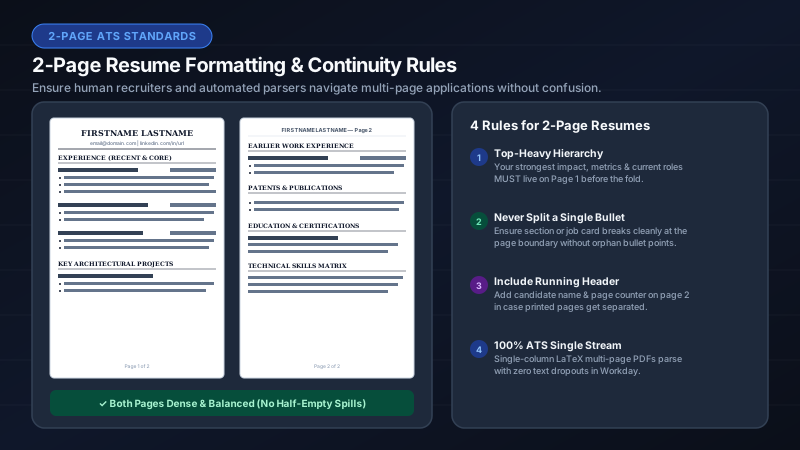
- Keep a single-column layout on both pages — never switch to two columns on page two.
- Do not repeat your name and contact block as a "header" on page two; ATS may read it twice.
- Continue sections naturally across the page break — do not start a new section just because you hit page two.
- Use the same font, size, and margins on both pages.
- Name the file Firstname_Lastname_Resume.pdf.
- Test with the paste method: copy all text from the PDF into a notepad and verify the reading order is correct across the page break.
The myths about two-page resumes and ATS
- Myth: "ATS only reads the first page." — False. Modern parsers (Workday, Greenhouse, Lever, iCIMS) process the entire document.
- Myth: "Recruiters auto-reject two-page resumes." — False. Recruiters auto-reject badly formatted resumes. Length is a human preference, not an ATS rule.
- Myth: "You need a page break marker." — False. A clean section transition at the natural break point is sufficient.
- Myth: "Two pages hurt your ATS keyword score." — False. Keyword matching is content-based, not length-based. More relevant content on page two can actually improve your score.
Best templates for two-page ATS resumes
LaTeX templates — especially Jake’s Resume and its variants — are ideal for multi-page resumes because they produce a single logical text stream with perfect Unicode mapping. IhateLaTeX generates these templates from a visual form, so you get two-page ATS safety without writing LaTeX. Use Advanced editing to control margins and spacing across both pages with a live preview.
Frequently asked questions
Is a 2-page resume ATS friendly?
Yes. ATS parsers read all pages sequentially and do not penalize length. What matters is single-column layout, standard headings, and text-based PDF formatting — not page count.
Will ATS read my second page?
Yes. Modern ATS platforms (Workday, Greenhouse, Lever, Taleo, iCIMS) parse the entire PDF text layer, including all pages.
Should I put "Page 2" or "continued" on my second page?
No. Let sections flow naturally across the page break. Adding page markers is unnecessary and can confuse some parsers.
Is a one-page or two-page resume better for ATS?
They are equally ATS-friendly if formatted correctly. Choose based on your experience level: one page for under 10 years, two pages when every line earns its place.
Related guides
- One-Page vs Two-Page Resume: What Recruiters Actually Prefer in 2026 · 6 min read
- How to Format a Two-Page ATS-Friendly Resume (With Examples) · 7 min read
- ATS-Friendly Resume Format in 2026: The Complete Formatting Guide · 9 min read
- ATS Resume PDF Format: Settings, Margins & File Rules for 2026 · 7 min read
Put it into practice
IhateLaTeX applies everything in this article automatically: ATS-safe templates, XYZ-bullet scoring, and pixel-perfect LaTeX — free, private, and compiled in your browser.
Build my resume free