ATS Resume PDF Format: Settings, Margins & File Rules for 2026
The exact PDF settings for ATS-compatible resumes: text-based vs scanned, margin sizes, font embedding, file naming, and how to verify your PDF parses correctly before submitting.
7 min read · Updated August 2026
Your resume PDF must be text-based (not a scanned image), single-column, and use embedded standard fonts. These are not preferences — they are requirements for Workday, Greenhouse, Lever, and Taleo parsers. Here are the exact PDF settings and a verification method you can run in 30 seconds.
PDF type: text-based vs scanned
- Text-based PDF (required): created by a word processor or typesetter; text is selectable and copyable.
- Scanned PDF (avoid): a photograph or scan of a printed resume; requires OCR which is unreliable.
- How to check: open your PDF, try to select and copy text. If you can highlight individual words, it is text-based.
- LaTeX PDFs are always text-based — another reason LaTeX resumes parse reliably.
PDF settings that matter
| Setting | Recommended value | Why |
|---|---|---|
| Page size | US Letter (8.5 × 11 in) | Standard in US; A4 for Europe |
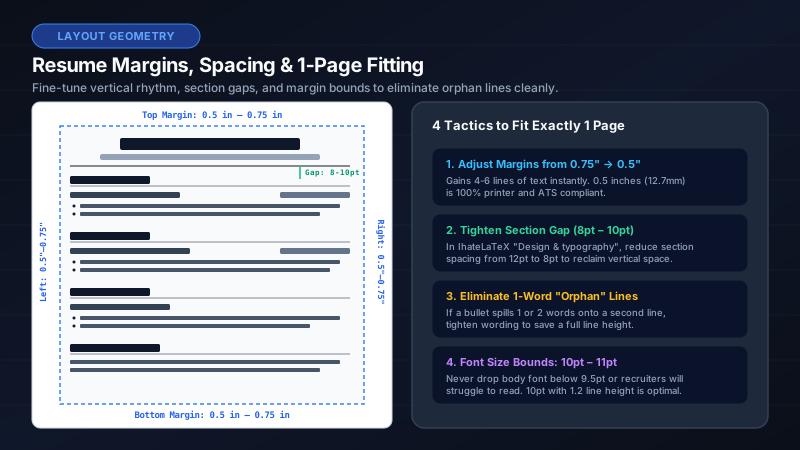
| Margins | 0.5–0.75 inches | Below 0.4 in risks print clipping; above 1 in wastes space |
| Font size | 10–12 pt | Below 10 pt hurts readability; above 12 pt looks unprofessional |
| Font embedding | Embedded (automatic in LaTeX) | Non-embedded fonts may render as garbage in parsers |
| Color | Black text on white background | Colored backgrounds reduce parse reliability |
| File size | Under 2 MB | Most ATS portals accept up to 5 MB; smaller is faster |
| Pages | 1–2 | Parsers read all pages; length does not affect parsing |
File naming convention
Name your file Firstname_Lastname_Resume.pdf — no spaces, no version numbers, no "final_v3_REAL.pdf". Recruiters and ATS systems sort by filename. Consistent naming signals professionalism.
The 30-second PDF verification test
- Open your PDF in any viewer.
- Select all text (Cmd+A / Ctrl+A) and copy.
- Paste into a plain text editor (Notepad, TextEdit).
- Read top to bottom: name → contact → sections in order.
- If anything is missing, out of order, or garbled — fix before submitting.
- IhateLaTeX’s ATS Score automates this plus content checks.
PDF vs DOCX for ATS
Modern ATS platforms parse both PDF and DOCX well. PDF preserves your layout exactly and is the default choice. Submit DOCX only when the job posting explicitly requests it. Never submit .jpg, .png, or .doc (legacy Word format).
Frequently asked questions
Is PDF or Word better for ATS?
PDF is preferred — it preserves layout and is universally accepted. Use DOCX only when the posting requests it. Both parse well in modern ATS if text-based.
What PDF settings are best for ATS?
Text-based PDF, US Letter, 0.5–0.75 in margins, 10–12 pt standard font, embedded fonts, under 2 MB. LaTeX PDFs meet all of these automatically.
How do I know if my PDF is ATS-compatible?
Run the paste test: copy all text from the PDF into Notepad. If the order is correct and nothing is missing, it will parse. IhateLaTeX’s ATS Score checks this automatically.
Related guides
- ATS-Friendly Resume Format in 2026: The Complete Formatting Guide · 9 min read
- The ATS Resume Checklist: 21 Rules to Pass Applicant Tracking Systems in 2026 · 10 min read
- Is a 2-Page Resume ATS Friendly? The Definitive Answer for 2026 · 8 min read
- Why a LaTeX Resume Beats Word and Canva for Job Applications · 7 min read
Put it into practice
IhateLaTeX applies everything in this article automatically: ATS-safe templates, XYZ-bullet scoring, and pixel-perfect LaTeX — free, private, and compiled in your browser.
Build my resume free