The ATS Resume Checklist: 21 Rules to Pass Applicant Tracking Systems in 2026
The definitive 2026 ATS checklist: exact formatting rules, section headings, keyword tactics, and file settings that get your resume parsed and ranked by Workday, Greenhouse, Lever, Taleo, and iCIMS.
10 min read · Updated August 2026
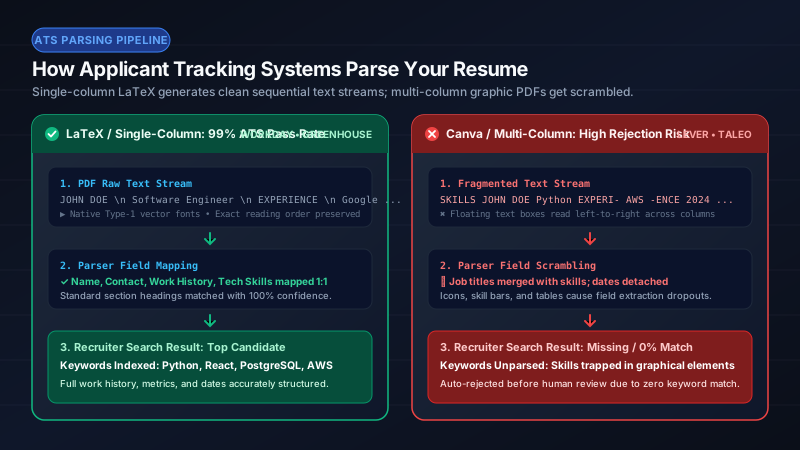
An Applicant Tracking System (ATS) does not "read" your resume the way a human does — it parses your file into structured fields and ranks them against the job description. Roughly 97% of Fortune 500 companies use one. This checklist covers every rule that materially affects whether your resume survives that parse, in the order you should apply them.
Format & file rules
- Submit PDF unless the posting explicitly demands .docx — a text-based (not scanned) PDF preserves layout everywhere.
- Use a single-column layout. Multi-column text is the #1 cause of scrambled parses.
- Avoid text boxes, headers/footers for critical info, tables for layout, images, icons, and skill-rating bars — parsers skip or mangle all of them.
- Use standard fonts at 10–12 pt (Computer Modern, Helvetica, Arial, Calibri). Exotic fonts can break glyph-to-unicode mapping.
- Name the file Firstname_Lastname_Resume.pdf.
Structure rules
- Use conventional section headings: Experience (not "Where I’ve Been"), Education, Skills, Projects, Certifications. Parsers classify sections by heading.
- Put contact details in the body of the document, never only in the header/footer region.
- Include a phone number, professional email, city/state, and LinkedIn URL. Portfolios matter for design roles.
- Order sections by relevance: Experience first for professionals, Education first for new grads.
- Keep dates in a consistent "Mon YYYY – Mon YYYY" format; parsers extract tenure from these.
Content rules
- Mirror the job description’s exact keyword phrasing where truthful ("CI/CD pipelines" vs "deployment automation") — match beats synonyms.
- Start every bullet with a strong action verb (Architected, Reduced, Led, Automated — not "Responsible for").
- Quantify: numbers, percentages, dollar amounts, scale. Aim for a metric in at least half your bullets.
- Use the XYZ formula: "Accomplished X, as measured by Y, by doing Z."
- Keep bullets to 1–2 lines; cut pronouns and filler ("I", "team player").
- List 8–30 skills, spelled as the job description spells them; skip graphical proficiency bars.
- One page for <10 years’ experience; two pages acceptable beyond that. Never pad.
How IhateLaTeX enforces this checklist automatically
Every template IhateLaTeX generates is single-column, text-layer-perfect, uses standard section headings, and embeds proper Unicode mapping (pdfgentounicode) so parsers extract clean text. The built-in ATS Score walks the remaining, content-side rules with specific fixes — all computed locally, for free.
Frequently asked questions
Do ATS systems actually auto-reject resumes?
Rarely on their own. Modern ATS platforms parse, score, and rank resumes to help recruiters triage; a badly parsed resume effectively hides you from that ranking. Formatting that survives parsing (single column, standard headings, real text) is therefore a ranking requirement, not a myth.
Should I include keywords white-on-white or hidden?
Never. Hidden text is flagged by modern parsers and can end your candidacy for dishonesty. Earn keywords by mirroring genuinely held skills in your bullets.
Is a PDF or Word file better for ATS?
Modern ATS platforms parse both well, but PDF preserves your layout exactly and is preferred unless the posting requests .docx.
How long should my resume be in 2026?
One page for under 10 years of experience; two pages for senior or academic profiles. Density matters more than length: every line must earn its place.
Related guides
- ATS-Friendly Resume Format in 2026: The Complete Formatting Guide · 9 min read
- ATS Resume PDF Format: Settings, Margins & File Rules for 2026 · 7 min read
- Is a 2-Page Resume ATS Friendly? The Definitive Answer for 2026 · 8 min read
- Resume Bullets That Win Interviews: The XYZ Formula + 120 Action Verbs · 8 min read
Put it into practice
IhateLaTeX applies everything in this article automatically: ATS-safe templates, XYZ-bullet scoring, and pixel-perfect LaTeX — free, private, and compiled in your browser.
Build my resume free