Jake’s Resume LaTeX Template: The Complete 2026 Guide
Everything about Jake’s Resume — the most popular LaTeX resume template in tech. What it is, why recruiters love it, how to customize it, and how to build one without writing a single line of LaTeX code.
11 min read · Updated August 2026
Jake’s Resume is the single most recommended LaTeX resume template in software engineering recruiting circles. Created by Jake Gutierrez and shared on GitHub and Overleaf, it became the de facto standard on r/cscareerquestions, Blind, and engineering career fairs. If you have seen a clean, single-column tech resume with small-caps section headings and tight margins — it was probably Jake’s.
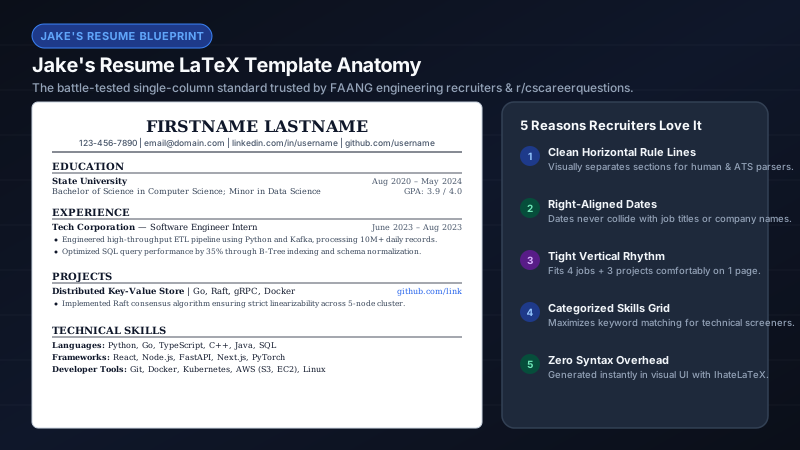
What makes Jake’s Resume special?
- Single-column layout — the #1 requirement for ATS parsers. No sidebars, no columns, no text boxes.
- Small-caps section headings with horizontal rules — visually distinct without graphics or icons.
- Tight but readable margins (typically 0.5–0.75 in) — fits 10+ years on one page when needed.
- Clean bullet formatting with consistent indentation and spacing.
- Hyperlinked contact info (email, LinkedIn, GitHub) that parsers still extract as plain text.
- No images, skill bars, or decorative elements — everything an ATS can read.
The anatomy of a Jake’s Resume
| Section | What goes here | Tips |
|---|---|---|
| Header | Name, phone, email, LinkedIn, GitHub, portfolio | Keep on one line if possible; use pipe separators |
| Education | Degree, school, GPA (if strong), relevant coursework | New grads: put this first; professionals: after experience |
| Experience | Company, title, dates, 3–5 achievement bullets each | Use XYZ formula; quantify everything |
| Projects | Personal or open-source work with tech stack | Great for students and career switchers |
| Skills | Languages, frameworks, tools — comma-separated or categorized | Mirror job description keywords exactly |
| Custom sections | Certifications, publications, awards, volunteering | Only if they strengthen your candidacy |
Jake’s Resume on Overleaf: the traditional path
The classic workflow: fork Jake’s template on Overleaf, manually edit the .tex file, compile, debug errors, repeat. Common pain points include "Misplaced alignment tab character &" (unescaped ampersands in company names), font package conflicts, margin overflow pushing content to page 2, and the free-tier compile timeout on complex documents. It works — but it assumes you enjoy debugging LaTeX.
Jake’s Resume without coding: the IhateLaTeX path
IhateLaTeX generates Jake’s Resume-style LaTeX from a visual form. You never see a backslash. The output is the same class of single-column, ATS-optimized PDF — compiled locally in your browser via WebAssembly with no time limits. You can still download the .tex source and continue in Overleaf if you want to hand-edit later.
- Open ihatelatex.com — Jake’s Resume is the default template.
- Fill in your sections using the visual form editor.
- Customize design: accent color, font size (10–12 pt), bullet style, section heading style.
- Use Advanced editing for margins, spacing, and bullet density if you need to fit one page.
- Run the ATS Score check to audit bullets, keywords, and contact completeness.
- Download the PDF or the .tex source.
Customization options that matter
- Accent color — any hex value; drives section rules, links, and skill categories.
- Font size — 10 pt for dense one-pagers, 11 pt default, 12 pt for executive readability.
- Section heading style — small caps with rule (classic Jake’s), accent underline, filled banner, or minimal caps.
- Margins — 0.5 in for squeeze, 0.75 in for standard, adjustable in Advanced editing.
- Bullet density — compact (one-page squeeze), normal, or relaxed (executive).
- Custom sections — add Publications, Awards, Certifications anywhere in the order.
Common Jake’s Resume mistakes to avoid
- Putting too many bullets per role — 3–5 max for recent jobs, 2–3 for older ones.
- Using weak openers like "Responsible for" or "Helped with" instead of action verbs.
- Listing 40+ skills without categorization — group by Languages, Frameworks, Tools.
- Including a photo or objective statement — both waste space and can confuse ATS parsers.
- Forgetting to hyperlink GitHub and LinkedIn — recruiters click these.
- Using two pages when one would do — Jake’s culture norm is a ruthless one-pager for under 10 years.
Frequently asked questions
Where can I find Jake’s Resume template?
On GitHub (sb2nov/resume) and Overleaf. Or use IhateLaTeX, which generates the same style from a visual form — no LaTeX knowledge required.
Is Jake’s Resume ATS-friendly?
Yes. Its single-column, text-only layout is specifically designed to survive Workday, Greenhouse, Lever, and Taleo parsers. It is one of the most ATS-tested templates in existence.
Can I use Jake’s Resume for non-tech roles?
Absolutely. The layout is conservative and professional — it works for finance, consulting, operations, and any role where a clean one-page resume is expected.
How do I fit Jake’s Resume on one page?
Cut redundant bullets first, then reduce margins to 0.5–0.6 in, switch to compact bullet density, and use 10 pt font. IhateLaTeX’s Advanced Editing panel exposes all of these with a live preview.
Related guides
- How to Use Jake’s Resume Template: Step-by-Step (No LaTeX Required) · 9 min read
- Jake’s Resume on Overleaf vs IhateLaTeX: Which Is Faster? · 7 min read
- Jake’s Resume GitHub Template: Download, Edit & Build Without LaTeX · 7 min read
- Best Free LaTeX Resume Templates in 2026 (Ranked & Compared) · 9 min read
Put it into practice
IhateLaTeX applies everything in this article automatically: ATS-safe templates, XYZ-bullet scoring, and pixel-perfect LaTeX — free, private, and compiled in your browser.
Build my resume free