Jake’s Resume on Overleaf vs IhateLaTeX: Which Is Faster?
Side-by-side comparison of building Jake’s Resume on Overleaf (manual LaTeX) vs IhateLaTeX (visual editor). Covers time, compile limits, privacy, ATS output, and when each tool makes sense.
7 min read · Updated August 2026
Jake’s Resume originated on Overleaf, and thousands of engineers still fork it there. But Overleaf was built for papers and theses — not resumes. Here is an honest comparison of the two workflows for the same template output.
The Overleaf workflow
- Search Overleaf for "Jake’s Resume" or fork from GitHub (sb2nov/resume).
- Read the .tex source to understand the structure.
- Manually edit LaTeX commands for each section (\section, \resumeItem, etc.).
- Compile and fix errors (unescaped &, missing braces, package conflicts).
- Tweak margins and spacing by editing \usepackage and \geometry commands.
- Download PDF. Repeat for every update.
Typical first-time setup: 1–3 hours including debugging. Each subsequent edit: 5–15 minutes. Requires LaTeX literacy.
The IhateLaTeX workflow
- Open ihatelatex.com — Jake’s Resume is pre-loaded.
- Fill the visual form for each section.
- Adjust design in the panel (no code).
- Download PDF. Done.
Typical first-time setup: 15–30 minutes. Each subsequent edit: 2–5 minutes. No LaTeX knowledge required.
Feature comparison
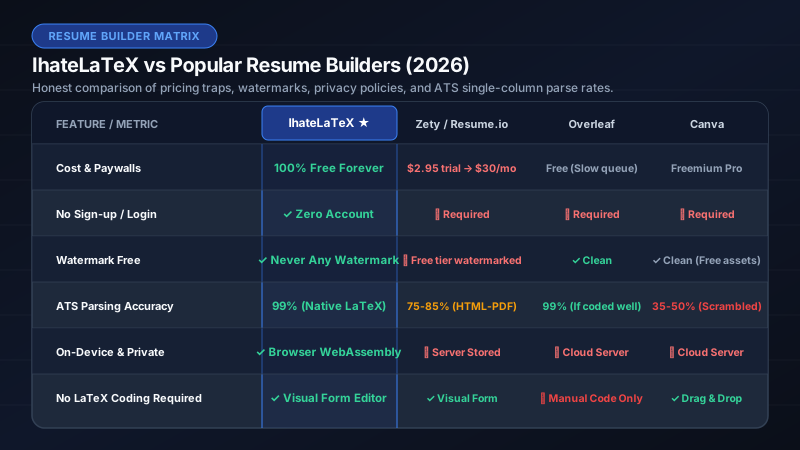
| Overleaf (Jake’s template) | IhateLaTeX (Jake’s template) | |
|---|---|---|
| LaTeX knowledge | Required | None |
| Time to first PDF | 1–3 hours | 15–30 minutes |
| Compile limits | Free tier timeout | Unlimited (local WASM) |
| Data location | Overleaf cloud | Your browser only |
| Files stay on device | No | Yes |
| ATS score checker | No | Built-in |
| Section reordering | Manual code edit | Drag and drop |
| Margin/spacing control | Edit LaTeX commands | Visual sliders |
| Export .tex source | Native | Download anytime |
| Price | Free tier; paid for features | $0 forever |
| PDF output quality | Identical LaTeX typesetting | Identical LaTeX typesetting |
When to use Overleaf for Jake’s Resume
- You already know LaTeX and enjoy fine-grained control over every macro.
- You want to heavily customize the template beyond what a form editor offers.
- You are collaborating with someone who also edits LaTeX.
- You are writing a paper and a resume in the same Overleaf project.
When to use IhateLaTeX for Jake’s Resume
- You want Jake’s Resume quality without learning LaTeX syntax.
- You need to update your resume quickly for each job application.
- You care about privacy — your resume should not live on someone else’s server.
- You want on-device processing and unlimited compiles.
- You want built-in ATS scoring and bullet-quality checks.
Frequently asked questions
Is the PDF output identical between Overleaf and IhateLaTeX?
Yes. Both use the same class of LaTeX engine (pdfTeX) and produce the same single-column, ATS-optimized PDF with identical text layers.
Can I start on IhateLaTeX and finish on Overleaf?
Yes. Download the .tex source from IhateLaTeX and upload it to any Overleaf project. It compiles without modification.
Does Overleaf have Jake’s Resume template?
Yes — search for "Jake Gutierrez Resume" or "sb2nov resume" on Overleaf. IhateLaTeX generates the same style without requiring you to edit the .tex manually.
Related guides
- LaTeX Resume Template on Overleaf: How to Use It (and a Faster Alternative) · 8 min read
- Best Overleaf Alternative for Resumes (2026): No LaTeX Required · 7 min read
- Jake’s Resume GitHub Template: Download, Edit & Build Without LaTeX · 7 min read
- Jake’s Resume LaTeX Template: The Complete 2026 Guide · 11 min read
Put it into practice
IhateLaTeX applies everything in this article automatically: ATS-safe templates, XYZ-bullet scoring, and pixel-perfect LaTeX — free, private, and compiled in your browser.
Build my resume free