LaTeX Resume Template on Overleaf: How to Use It (and a Faster Alternative)
Step-by-step guide to finding and using LaTeX resume templates on Overleaf — plus a visual editor that generates the same ATS-safe output without writing LaTeX code.
8 min read · Updated August 2026
Overleaf hosts dozens of LaTeX resume templates — Jake’s Resume, Deedy, AltaCV, and more. The workflow is powerful but slow: fork a template, edit raw LaTeX, compile, debug errors, repeat. This guide walks through the Overleaf path and introduces a faster alternative that produces identical ATS-safe PDFs from a visual form.
How to find resume templates on Overleaf
- Go to overleaf.com and sign in (free account required).
- Click "New Project" → "View All Templates".
- Search for "resume", "CV", or "Jake Gutierrez".
- Popular picks: Jake’s Resume (sb2nov), Deedy Resume, AltaCV, Awesome CV.
- Click "Open as Template" to fork into your account.
Editing a resume template on Overleaf
Once forked, you edit the main.tex file directly. Common LaTeX commands you will encounter: \section{} for headings, \resumeItem{} or \item for bullets, \textbf{} for bold, and \href{} for links. Every special character in your content (especially & in company names) must be escaped as \&. Compile with the green Recompile button; errors appear in the log panel.
Common Overleaf resume problems
- Compile timeout on the free tier — complex templates or large images trigger it.
- Unescaped special characters — ampersands, underscores, and percent signs break compilation.
- Package conflicts — mixing templates or adding packages can break the build.
- Margin overflow — content spilling to page 3 when you wanted one page.
- No ATS feedback — you compile a PDF but have no idea if parsers will read it correctly.
- Cloud-only — your resume lives on Overleaf’s servers, tied to your account.
The faster alternative: visual LaTeX resume building
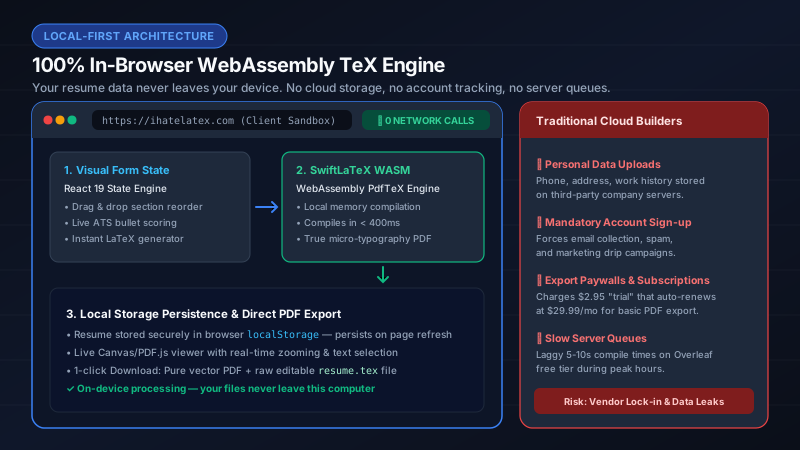
IhateLaTeX generates the same class of single-column, ATS-optimized LaTeX from a visual form. Jake’s Resume is the default template. You fill sections, pick design options, run the built-in ATS Score, and download the PDF — compiled locally in your browser with no time limits. You can still download the .tex source and import it into Overleaf for advanced customization.
| Overleaf | IhateLaTeX | |
|---|---|---|
| Find template | Search gallery, fork manually | Pre-loaded (Jake’s + 3 more) |
| Edit content | Write LaTeX code | Visual form |
| Compile | Cloud (timeout on free) | Local WASM (unlimited) |
| ATS checker | None | Built-in |
| On-device processing | No | Yes |
| Export .tex | Native | Download anytime |
Frequently asked questions
What is the best LaTeX resume template on Overleaf?
Jake’s Resume (sb2nov/resume) for tech roles — single-column, ATS-tested. For a visual editor with the same output, use IhateLaTeX.
Is Overleaf free for resumes?
Overleaf has a free tier with compile timeouts. IhateLaTeX is free with unlimited local compiles and no account required.
Can I use an Overleaf template without knowing LaTeX?
Not easily. IhateLaTeX is designed for exactly this — same LaTeX quality, zero syntax required.
Related guides
- Jake’s Resume LaTeX Template: The Complete 2026 Guide · 11 min read
- Jake’s Resume on Overleaf vs IhateLaTeX: Which Is Faster? · 7 min read
- Best Free LaTeX Resume Templates in 2026 (Ranked & Compared) · 9 min read
- LaTeX Resume Guide: Why Recruiters Love It & How to Get One Without Coding · 7 min read
Put it into practice
IhateLaTeX applies everything in this article automatically: ATS-safe templates, XYZ-bullet scoring, and pixel-perfect LaTeX — free, private, and compiled in your browser.
Build my resume free