Best Overleaf Alternative for Resumes (2026): No LaTeX Required
Overleaf is great for papers but painful for resumes. Compare the best Overleaf alternatives for resume building: IhateLaTeX, Papeeria, TeXstudio, and visual builders — ranked by ease, ATS output, and privacy.
7 min read · Updated August 2026
Overleaf is the dominant online LaTeX editor — but it was built for academic papers, not resumes. If you want LaTeX-quality resume PDFs without writing code, dealing with compile timeouts, or uploading your CV to the cloud, here are the best alternatives ranked for resume-specific use.
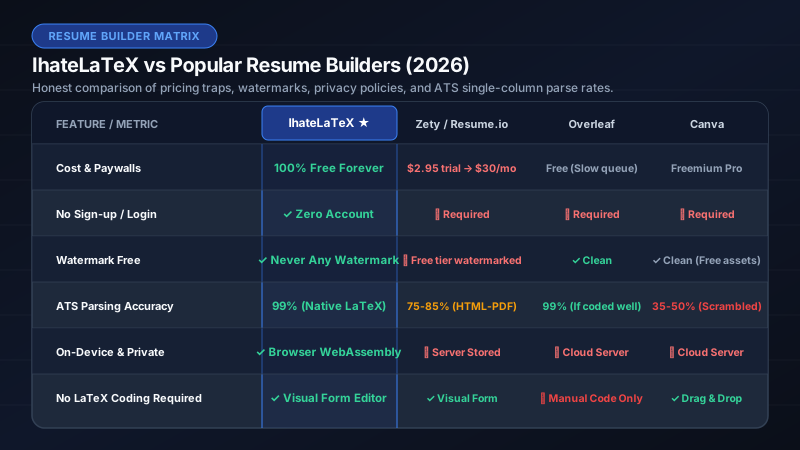
Ranked alternatives
| Tool | LaTeX required? | Resume-focused? | Files stay on device? | Price |
|---|---|---|---|---|
| IhateLaTeX | No | Yes (built for it) | Yes (PWA) | Free |
| Papeeria | Yes | No (general editor) | No | Free tier |
| TeXstudio (local) | Yes | No (general editor) | Yes | Free |
| CoCalc | Yes | No | No | Free tier |
| SwiftLaTeX | Yes | No | Partial | Free |
| Overleaf | Yes | No (general editor) | No | Free tier |
Why IhateLaTeX is the best Overleaf alternative for resumes
- Purpose-built for resumes — form editor, ATS score, section templates, not a blank code editor.
- No LaTeX knowledge required — generates Jake’s Resume and 3 other templates from your data.
- Unlimited compiles — WebAssembly engine runs locally, no timeout.
- Private — data never leaves your browser; Overleaf stores everything in the cloud.
- Private — files never leave the device.
- Still exports .tex — download the source and continue in Overleaf anytime.
When to stick with Overleaf
Overleaf remains the best choice for collaborative paper writing, journal submissions, theses, and shared LaTeX projects. Its real-time collaboration, Git integration, and template gallery for academic documents are unmatched. For resumes specifically, IhateLaTeX is faster and requires zero LaTeX knowledge.
Frequently asked questions
What is the best Overleaf alternative?
For resumes: IhateLaTeX (visual editor, ATS-safe, free, private). For papers: TeXstudio (local) or Papeeria (online). For collaboration: Overleaf itself.
Can I use IhateLaTeX instead of Overleaf?
For resumes and CVs, yes — it is faster, private, and requires no coding. For academic papers, use IhateLaTeX’s separate Paper Editor or Overleaf.
Is there a free Overleaf alternative?
IhateLaTeX is free with unlimited compiles for resumes. TeXstudio is free for local LaTeX editing. Papeeria has a free online tier.
Related guides
- Jake’s Resume on Overleaf vs IhateLaTeX: Which Is Faster? · 7 min read
- LaTeX Resume Template on Overleaf: How to Use It (and a Faster Alternative) · 8 min read
- IhateLaTeX vs Overleaf and Canva: Which Should Build Your Resume? · 6 min read
- What Is IhateLaTeX? The Free Private LaTeX Resume Builder Explained · 7 min read
Put it into practice
IhateLaTeX applies everything in this article automatically: ATS-safe templates, XYZ-bullet scoring, and pixel-perfect LaTeX — free, private, and compiled in your browser.
Build my resume free