Jake's Resume Without Overleaf — Free ATS PDF in Your Browser
Overleaf times out on Jake's Resume. Canva PDFs fail Workday and Greenhouse. Compile the same single-column LaTeX in your browser — no account, no paywall.
6 min read · Updated September 2026
Overleaf’s free tier times out on Jake’s Resume. Canva PDFs fail Workday, Greenhouse, and Lever. IhateLaTeX compiles the same single-column LaTeX in your browser — no account, no compile limit, no download paywall.
IhateLaTeX vs Overleaf
Overleaf is a phenomenal general-purpose LaTeX IDE — for papers. For resumes it has three friction points: (1) you must find, fork, and hand-edit a template like Jake’s Resume, debugging syntax errors yourself; (2) the free tier limits compile time and collaborations; (3) your documents live on Overleaf’s servers. IhateLaTeX keeps the exact same output quality — it generates the same class of single-column ATS LaTeX — but replaces the code editor with a form, compiles on your device via WebAssembly with no time limits, and stores nothing.
| Aspect | IhateLaTeX | Overleaf |
|---|---|---|
| LaTeX knowledge required | None | Required |
| Resume-specific guidance | ATS score, XYZ-bullet checks, section templates | None — general editor |
| Compile limits (free) | None (local WASM) | Compile timeout on free tier |
| Data location | Your browser only | Overleaf cloud |
| Files stay on device | Yes | No |
| Price | Free forever | Free tier; paid plans for features |
IhateLaTeX vs Canva
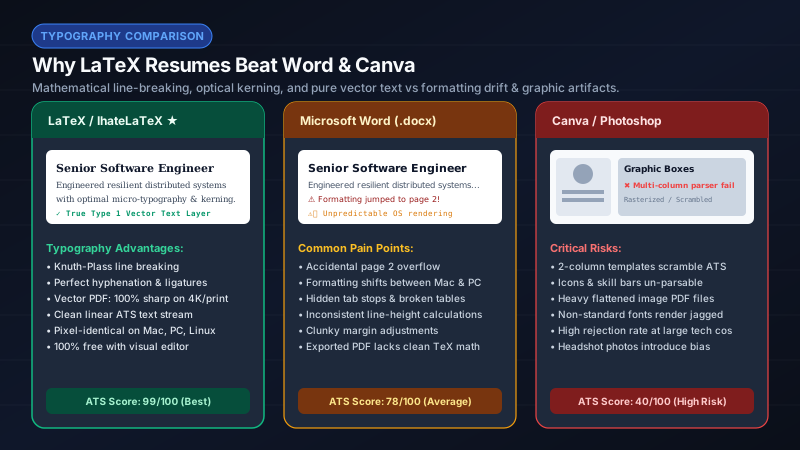
Canva resumes look stunning and parse terribly. Canva’s export engine positions text in arbitrary boxes; ATS parsers frequently read columns interleaved line-by-line, drop icons and skill bars entirely, and mangle dates. Multiple recruiting-platform studies put Canva-style PDFs among the worst parse rates of any popular source. If a job application goes through Workday or Taleo (most Fortune 500 applications do), a Canva PDF is a self-inflicted wound.
When Overleaf or Canva are still the right choice
- Overleaf: journal papers, theses, shared LaTeX projects — its collaboration tooling is unmatched.
- Canva: infographics, pitch decks, and visual CVs you will deliver as a printed artifact or image.
- IhateLaTeX: resumes and CVs that must pass automated screens and impress humans — which is 95% of job applications.
Frequently asked questions
Can I use Jake’s Resume template on Overleaf?
Yes — Jake’s template originated on Overleaf. IhateLaTeX generates the same style of ATS-optimized single-column LaTeX automatically, and you can download the .tex source and continue it in Overleaf at any time.
Are Canva resumes really bad for ATS?
They are risky. Canva PDFs often contain multi-column text boxes, icons, and graphics that ATS parsers skip or scramble. If you apply through an ATS, use a single-column, text-first format like the ones IhateLaTeX produces.
Is IhateLaTeX an Overleaf alternative?
For resumes and CVs, yes — it delivers the same typeset quality with no coding, no compile limits, and full on-device compilation. For papers and theses, the suite’s separate Paper Editor covers that use case.
Related guides
- Best Overleaf Alternative for Resumes (2026): No LaTeX Required · 7 min read
- Jake’s Resume on Overleaf vs IhateLaTeX: Which Is Faster? · 7 min read
- LaTeX Resume Template on Overleaf: How to Use It (and a Faster Alternative) · 8 min read
- Why a LaTeX Resume Beats Word and Canva for Job Applications · 7 min read
Put it into practice
IhateLaTeX applies everything in this article automatically: ATS-safe templates, XYZ-bullet scoring, and pixel-perfect LaTeX — free, private, and compiled in your browser.
Build my resume free