How to Use Jake’s Resume Template: Step-by-Step (No LaTeX Required)
A practical walkthrough for building a Jake’s Resume from scratch using IhateLaTeX’s visual editor. Covers every section, design choices, ATS checks, and export options — in under 15 minutes.
9 min read · Updated August 2026
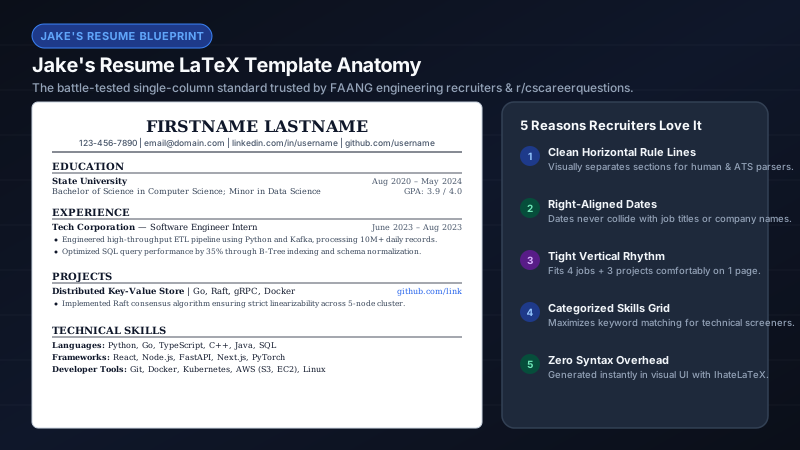
This is a hands-on tutorial for building a Jake’s Resume without touching LaTeX code. You will use IhateLaTeX’s visual form editor, which generates the same ATS-optimized LaTeX that millions of engineers compile manually on Overleaf — but in about 15 minutes instead of an afternoon of debugging.
Step 1: Open the editor and enter contact info
Go to ihatelatex.com. The editor opens with Jake’s Resume as the default template. Fill in the contact card: full name, phone number, professional email, city and state, LinkedIn URL, GitHub URL, and portfolio/website if you have one. The PDF preview updates live on the right panel.
Step 2: Add your education
- Institution name, degree, and major.
- Graduation date (or expected date for current students).
- GPA — include only if 3.5+ or if the job posting asks for it.
- Relevant coursework — 3–5 courses that match the target role.
- Honors, dean’s list, scholarships — one line each.
Step 3: Add experience (the most important section)
For each role: company name, job title, location, and date range (Mon YYYY – Mon YYYY format). Then write 3–5 achievement bullets using the XYZ formula: "Accomplished [X], as measured by [Y], by doing [Z]."
| Weak | Strong (XYZ) |
|---|---|
| Worked on backend services | Reduced API p99 latency 42% by redesigning the caching layer in Rust, saving $12k/month in compute |
| Helped with mobile app | Shipped in-app checkout used by 200k monthly users, lifting conversion 11% |
| Managed a team | Led 6 engineers across 3 time zones to deliver SOC 2 audit two weeks ahead of schedule |
Step 4: Add projects (especially for students)
Personal projects, open-source contributions, hackathon wins, and class projects all belong here. Include the project name, tech stack, a one-line description, and 1–2 achievement bullets. Projects compensate for thin experience sections — they are often the deciding factor for new grads.
Step 5: Add skills
- List 8–30 skills, spelled exactly as they appear in your target job descriptions.
- Group by category if you have many: Languages, Frameworks, Tools, Cloud, Databases.
- Skip proficiency bars or star ratings — ATS parsers cannot read them.
- Put your strongest, most relevant skills first within each category.
Step 6: Customize design
Open the Design & typography panel. Jake’s Resume is already selected. Adjust accent color (blue is the classic default), font size (11 pt is standard; 10 pt for one-page squeeze), and bullet style. If content overflows to page two, open Advanced editing: reduce margins to 0.5–0.6 in, set bullet density to Compact, and reduce section gaps to 4–6 pt.
Step 7: Run the ATS Score check
Click the ATS Score button. It audits your resume locally for: contact completeness, quantified achievements, action-verb strength, skill density, standard section hierarchy, and single-column readability. Each check includes a specific fix. Apply the suggestions and re-run until you are green.
Step 8: Export and apply
- Download PDF — name it Firstname_Lastname_Resume.pdf.
- Save JSON backup — preserves all data for editing on another device.
- Download .tex source — if you want to continue in Overleaf later.
- Install as PWA — keep editing on this device during your job search.
Frequently asked questions
How long does it take to build a Jake’s Resume on IhateLaTeX?
15–30 minutes for a first draft with 2–3 roles. Returning users with a JSON backup can update and re-export in under 5 minutes.
Can I import an existing resume?
Yes. Use the PDF import feature to extract text from an existing resume and populate the form fields automatically.
What if I need a custom section like Publications?
Click "New custom section" in the editor. Name it, add entries, and drag it to any position in the section order.
Related guides
- Jake’s Resume LaTeX Template: The Complete 2026 Guide · 11 min read
- Every IhateLaTeX Feature Explained (and How to Use It) · 9 min read
- Resume Bullets That Win Interviews: The XYZ Formula + 120 Action Verbs · 8 min read
- The ATS Resume Checklist: 21 Rules to Pass Applicant Tracking Systems in 2026 · 10 min read
Put it into practice
IhateLaTeX applies everything in this article automatically: ATS-safe templates, XYZ-bullet scoring, and pixel-perfect LaTeX — free, private, and compiled in your browser.
Build my resume free