Every IhateLaTeX Feature Explained (and How to Use It)
A complete walkthrough of IhateLaTeX: the visual LaTeX resume editor, section reordering, custom sections, design controls, advanced spacing, ATS scoring, on-device compilation, and the LaTeX tool suite.
9 min read · Updated August 2026
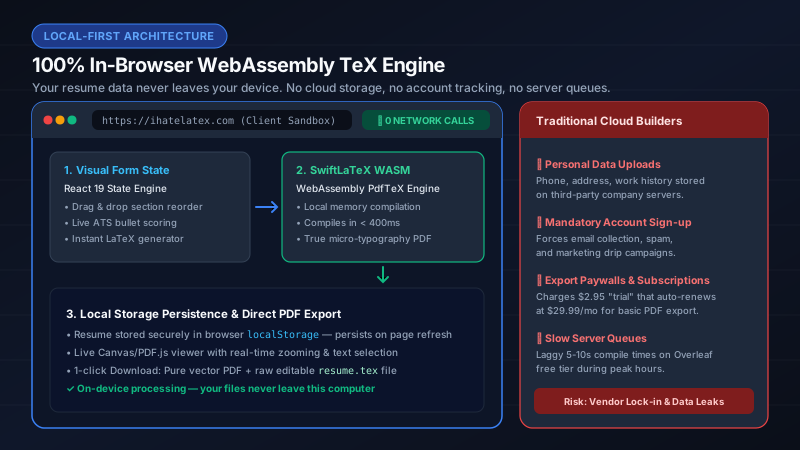
IhateLaTeX is a free, private LaTeX resume builder that runs entirely in your browser. You fill in a visual form; IhateLaTeX writes production-grade LaTeX for you and compiles it to a pixel-perfect, ATS-safe PDF using a WebAssembly TeX engine — no servers, no sign-up, no LaTeX syntax required. This guide explains every feature and exactly how to use it.
The workspace: edit and preview side by side
The editor is split into two panels. The left panel is your resume content (the form); the right panel shows the compiled PDF. Every keystroke re-generates the LaTeX source and recompiles it locally, usually in under a second. Drag the divider between the panels to give either side more room. On phones, the panels become two tabs — "Edit resume" and "Preview PDF" — switchable from the bottom navigation bar.
Resume sections: add, remove, reorder, and hide
Your resume is a stack of section cards: Professional Summary, Education, Experience, Projects, Skills, Certifications, plus any custom sections you create. The PDF renders these cards in exactly the order you arrange them.
- Reorder: use the ↑ / ↓ arrow buttons on any card (works with touch), or drag the dotted handle on desktop. The PDF follows your order instantly.
- Remove without losing data: the eye-slash button hides a section from the PDF. Your content is preserved and the section appears in the "Add a section" tray, so you can bring it back with one tap.
- Add built-in sections: hidden sections wait in the "Add a section" tray at the bottom of the editor. Tap a chip to restore it.
- Custom sections: tap "New custom section" to create anything — Leadership, Publications, Awards, Volunteering, Languages. Each custom section is an independent card that can be placed anywhere in the order, not just at the bottom.
- Rename custom sections: the title field inside the card becomes the section heading in the PDF.
Design & typography panel
Open the "Design & typography" card to control how your resume looks without touching any code:
- Templates — Jake’s Resume (the ATS gold standard), Classic Academic CV, Minimalist Modern, and Executive Professional. Every template renders every section, so switching never drops content.
- Section heading style — Small caps with a rule, accent underline, filled banner, or minimal caps.
- Font family and size — Serif (Computer Modern), sans-serif, or monospace at 10/11/12 pt.
- Bullet style — round bullets, dashes, arrows, or hollow circles.
- Accent color — any hex color; drives headings, rules, links, and skill categories (depending on template).
Advanced editing: fine-tune the layout
Inside the design panel, "Advanced editing" opens precision controls that professional typesetters care about:
| Control | Range | Use it when |
|---|---|---|
| Page margin | 0.40–1.00 in | Squeezing to one page (lower) or adding executive whitespace (higher) |
| Space before sections | 0–24 pt | Airier section separation; the #1 lever for filling a short resume |
| Space between entries | 0–12 pt | Separating dense jobs or projects from each other |
| Per-section spacing | 0–48 pt each | Extra breathing room before specific sections only (e.g., Projects) |
| Line spacing | 0.95×–1.30× | Tightening dense bullets or loosening thin content |
| Bullet indent | 0.05–0.50 in | Matching your template’s visual rhythm |
| Bullet density | compact / normal / relaxed | One-page squeeze vs. executive readability |
Every control shows its current value and a reset icon that returns it to the template default. "Reset all" clears every override at once. Nothing is applied blindly — the live PDF preview updates so you can see the typography change as you drag.
ATS Score: audit before you apply
The ATS Score button runs a local audit of your resume against the rules recruiters’ software actually applies: contact detail completeness, quantified achievements (the Google XYZ formula), action-verb strength, skill density, standard section hierarchy, and single-column machine readability. Each check includes a concrete fix — no dark patterns, no "unlock your score" paywall.
LaTeX source, backups, and portability
- LaTeX source card — inspect, copy, or download the exact .tex file. Paste it straight into Overleaf or compile it with a local pdflatex; it has zero IhateLaTeX-specific dependencies.
- JSON backup — export your full resume data and import it on any device. Your data belongs to you.
- Autosave — every change is saved to your device automatically. No account, no cloud, no "upgrade to save".
Install as an app: files stay on this device
You can install IhateLaTeX as an app from the browser menu or the ••• menu. Compilation is on-device processing: your resume data never leaves the device — there is simply no server to send it to. Keep a network connection while the TeX engine and packages finish loading.
The rest of the suite (also free, also private)
- Research Paper & Thesis Builder — structured IEEE/ACM/arXiv/thesis drafting without LaTeX, local folder support, and zero coding.
- Table Wizard — paste from Excel/Google Sheets, get publication-grade booktabs or tabularx LaTeX tables.
- Math & Formula Studio — visual equation builder, handwriting pad, and image OCR that exports LaTeX, MathML, or Typst.
- TikZ Studio — generate neural-network diagrams, flowcharts, and state machines as vector TikZ code.
- Paper Editor — an on-device Overleaf alternative for IEEE/ACM-style papers with live WASM compilation.
Frequently asked questions
Is IhateLaTeX really free? Where is the catch?
There is no catch: no watermarks, no export limits, no account. The project is supported by voluntary donations. Compilation happens on your device, so marginal cost per user is essentially zero.
Can I use IhateLaTeX on my phone?
Yes. The editor is fully responsive: sections become tabs, reorder buttons are touch-friendly, and the PDF preview uses a mobile-optimized viewer. You can also install it as a PWA; files stay on this device.
How do I move my resume to another computer?
Use "Save backup (.json)" from the ••• menu, then "Import backup" on the other device. The JSON contains your entire resume including custom sections and design settings.
Does switching templates lose my content?
Never. All four templates render the same underlying data and every section type, so switching is purely a visual change.
Related guides
- Advanced Editing: Margins, Section Spacing & Layout Fine-Tuning · 6 min read
- What Is IhateLaTeX? The Free Private LaTeX Resume Builder Explained · 7 min read
- How to Use Jake’s Resume Template: Step-by-Step (No LaTeX Required) · 9 min read
- The ATS Resume Checklist: 21 Rules to Pass Applicant Tracking Systems in 2026 · 10 min read
Put it into practice
IhateLaTeX applies everything in this article automatically: ATS-safe templates, XYZ-bullet scoring, and pixel-perfect LaTeX — free, private, and compiled in your browser.
Build my resume free