Advanced Editing: Margins, Section Spacing & Layout Fine-Tuning
Learn to control page margins, section spacing, per-section gaps, line spacing, and bullet density in IhateLaTeX’s Advanced Editing panel — with recommended settings for one-page tech resumes and executive CVs.
6 min read · Updated August 2026
Whitespace is the most underrated resume tool. The difference between a cramped, unreadable resume and a clean, scannable one is rarely the content — it is margins, section gaps, and line rhythm. IhateLaTeX’s Advanced Editing panel (inside Design & typography) gives you precise control over all three, with a live PDF preview.
Page margin: the first lever
Direct answer: 0.5–0.75 inches is the safe range for resume margins. Below 0.4 in, printers and ATS text-extraction both start to struggle; above 1 in you waste prime real estate.
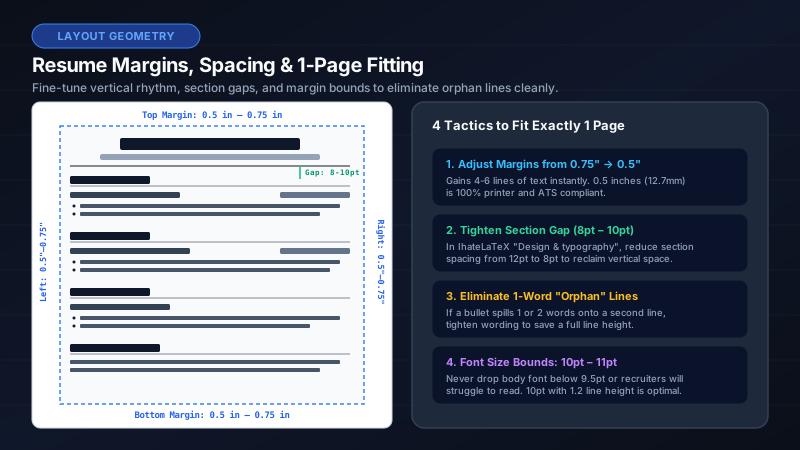
- 0.75 in — the classic, safe default for academic and executive documents.
- 0.5–0.6 in — the sweet spot for experienced professionals fitting 10+ years on one page.
- 0.4 in — emergency squeeze for students with heavy coursework lists; still ATS-safe because the text layer stays linear.
Section spacing: separate ideas, guide the eye
"Space before sections" adds a vertical gap above every section heading. Recruiters scan in an F-pattern; distinct blocks of whitespace tell their eyes where a new chapter starts. Start at 6–8 pt if your resume feels dense, 10–12 pt if it feels sparse.
Per-section overrides: the pro move
Sometimes only one transition needs help — for example, extra space before Projects to visually close the "career story" before the "portfolio story". The per-section list lets you set an absolute gap for any individual section (in points), overriding the global value. Leave the field empty to inherit the global gap.
Entry spacing and bullet density
"Space between entries" adds breathing room between individual jobs, degrees, or projects — useful when each entry has 4–5 bullets. "Bullet density" changes the rhythm inside those entries:
- Compact — removes inter-bullet padding; fits ~15% more content on the page. Best for one-page tech resumes at 10 pt.
- Normal — the template’s hand-tuned default. Right for most people.
- Relaxed — adds 4 pt between bullets; pairs well with 12 pt fonts and executive templates.
Line spacing: the fine print
Line spacing multiplies the leading of every line. 1.00 is the LaTeX default. Going below 0.95 makes text visually collide; going above 1.15 starts to look like a term paper. A 1.05–1.10 setting is a subtle way to make a short resume easier to read without looking padded.
Proven presets
| Goal | Margin | Section gap | Entry gap | Line spacing | Bullets |
|---|---|---|---|---|---|
| New grad, one page | 0.6 in | 6 pt | 0 pt | 1.00× | Normal |
| Senior dev, dense one-pager | 0.5 in | 4 pt | 2 pt | 0.98× | Compact |
| Career changer, airy re-skill CV | 0.75 in | 10 pt | 4 pt | 1.08× | Relaxed |
| Executive / board profile | 0.8 in | 12 pt | 6 pt | 1.10× | Relaxed |
| Academic CV (multi-page OK) | 0.75 in | 8 pt | 4 pt | 1.05× | Normal |
Frequently asked questions
What margin should I use for a one-page resume?
Start at 0.6 inches. If content still overflows, drop to 0.5 inches and switch bullets to Compact density before cutting content — recruiters value complete achievement bullets over extra whitespace.
Do small margins hurt ATS parsing?
No. ATS parsers read the PDF text layer, which is independent of visual margins. Only extreme margins below ~0.4 in risk clipping on physical printouts.
How do I add space before only one section?
Open Design & typography → Advanced editing → Per-section spacing, and set a pt value for that specific section. It overrides the global "Space before sections" value.
Related guides
Put it into practice
IhateLaTeX applies everything in this article automatically: ATS-safe templates, XYZ-bullet scoring, and pixel-perfect LaTeX — free, private, and compiled in your browser.
Build my resume free